




How Can We Help?
Find answers to common questions, learn how to use key features, and manage your account with ease. Start here to get the most out of DolphinRadar.
Plans, Features & Account Help
DolphinRadar (dolphinradar.com) provides detailed weekly reports on likes, new follows, unfollows, tagged users, and interest patterns for public Instagram accounts. Reports also include a visual social relationship map, cumulative trends in the Ties & Trails panel, and hashtag analysis. Quarterly and annual subscribers can access AI Insights with up to 9 analysis modules, including MBTI profiling, psychological analysis, relationship mapping, and predicted encounter locations.
Want to see what the report looks like? View a sample analytics report— the data and analytics shown in the sample are consistent with what you’ll receive in your final report.
You can check your registered email directly from your dashboard:
On Desktop: Go to Dashboard (top-right corner) → Settings → Account Details → Email address
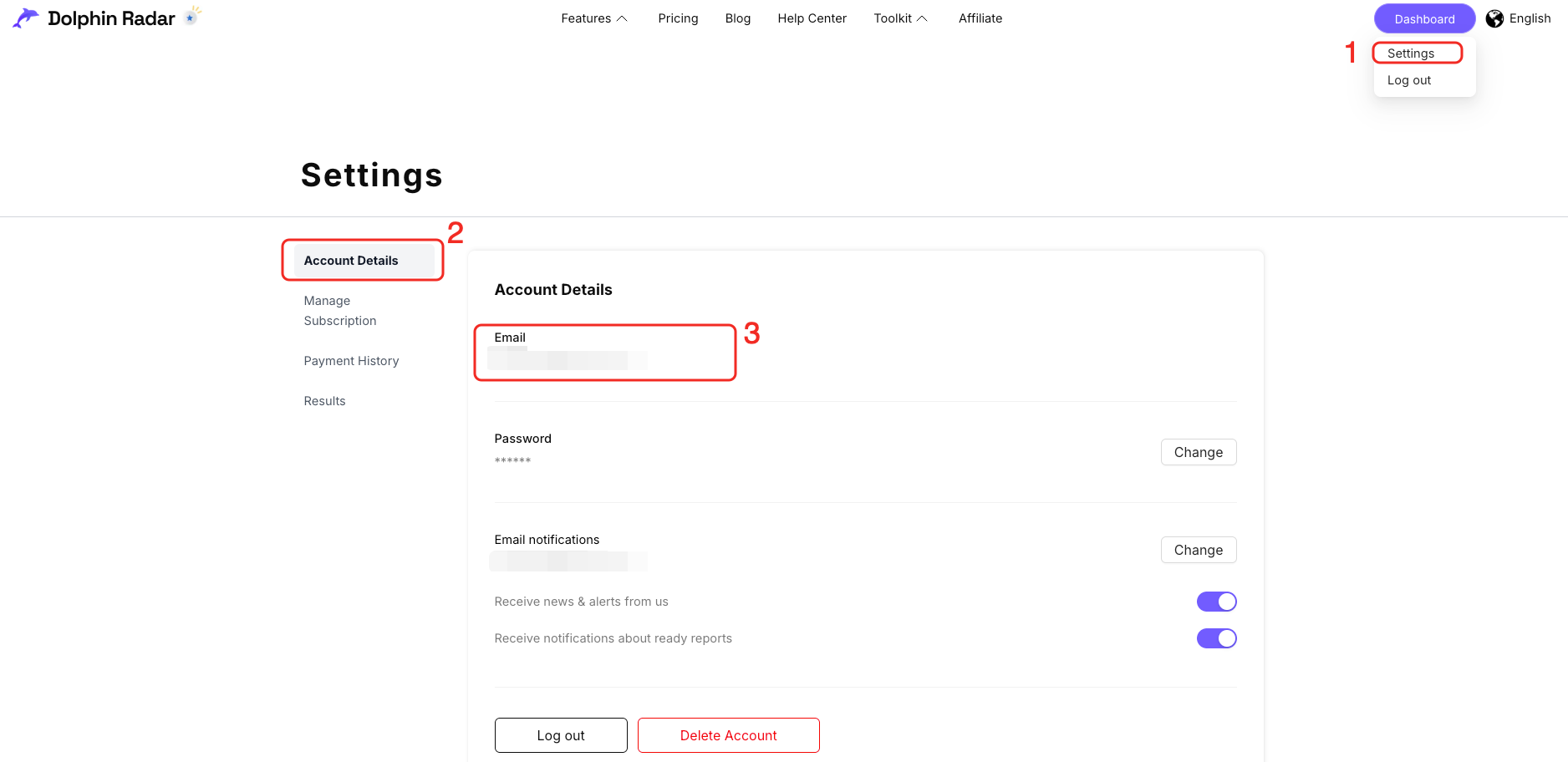
On Mobile: Open the Menu → Settings → Email address
DolphinRadar (dolphinradar.com) provides detailed weekly reports on likes, new follows, unfollows, tagged users, and interest patterns for public Instagram accounts. Reports also include a visual social relationship map, cumulative trends in the Ties & Trails panel, and hashtag analysis. Quarterly and annual subscribers can access AI Insights with up to 9 analysis modules, including MBTI profiling, psychological analysis, relationship mapping, and predicted encounter locations.
Want to see what the report looks like? View a sample analytics report— the data and analytics shown in the sample are consistent with what you’ll receive in your final report.
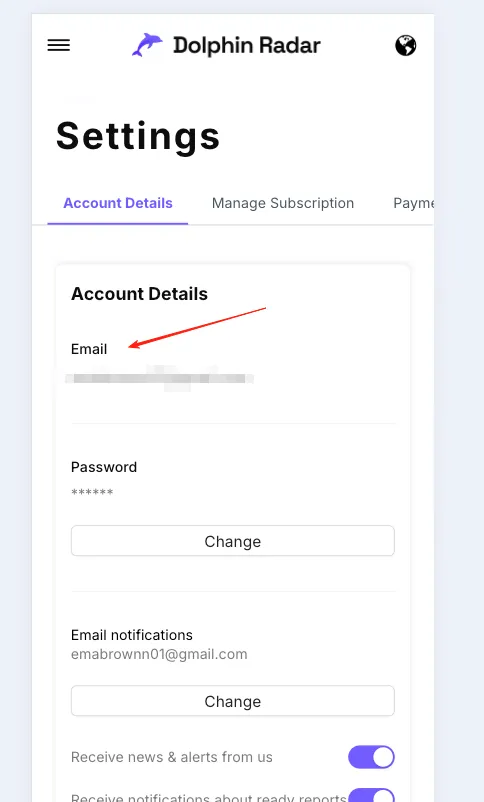
You can check your registered email directly from your dashboard:
On Desktop: Go to Dashboard (top-right corner) → Settings → Account Details → Email address
On Mobile: Open the Menu → Settings → Email address
An empty report usually means one of the following:
1. Check the account's privacy status
Review the tracked account in your Dashboard to confirm it is set to public. DolphinRadar can only track public accounts.
2. Verify recent account activity
Ensure the account has posted new content or Stories within the last 7 days. If there has been no activity during this period, no new data will be generated.
3. Allow time for automatic data collection
If the account is public and currently active, the system will automatically retry fetching the data. Please allow up to 24 hours for the report to update.
If the report remains empty after 24 hours, please feel free to contact our support team at [email protected].
Tracking subscriptions are tied to the Instagram account selected when the subscription starts, so the tracked account cannot be changed or removed during an active subscription.
- If you want to track a different account, you’ll need to start a new subscription for that account.
- If you no longer want to continue tracking the current account, you can cancel your subscription. Please refer to “How do I cancel my subscription?” in the Billing & Payments section for cancellation instructions.
- If the tracked account turns private during the tracking process, please contact us at [email protected].
Before purchasing, please double-check that the Instagram username you enter is correct.
Please note that all receipts and invoices are issued directly by our payment processor, Stripe. To obtain your receipt or invoice, kindly contact Stripe Support via the link below:
They will be able to assist you further. If you have any other questions, please feel free to contact our support team at [email protected].
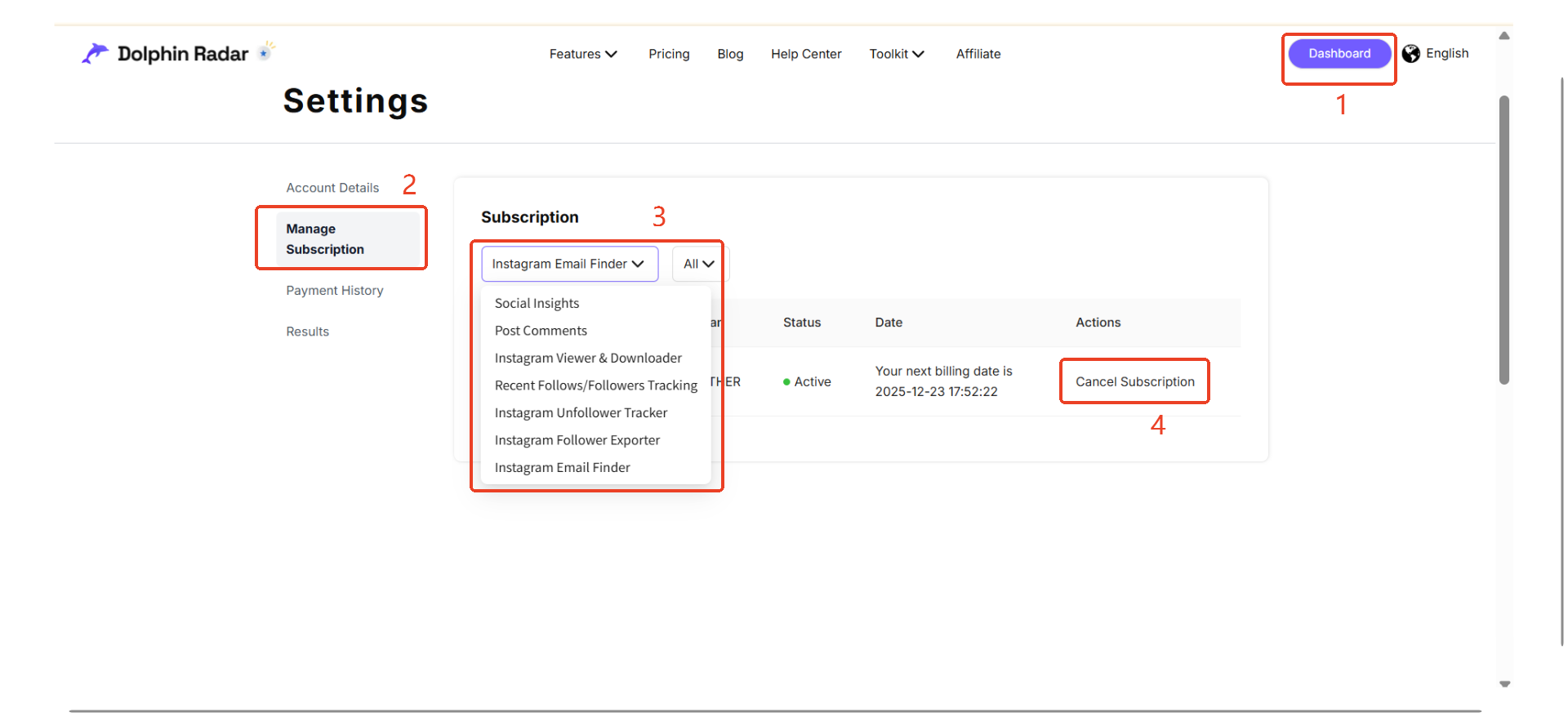
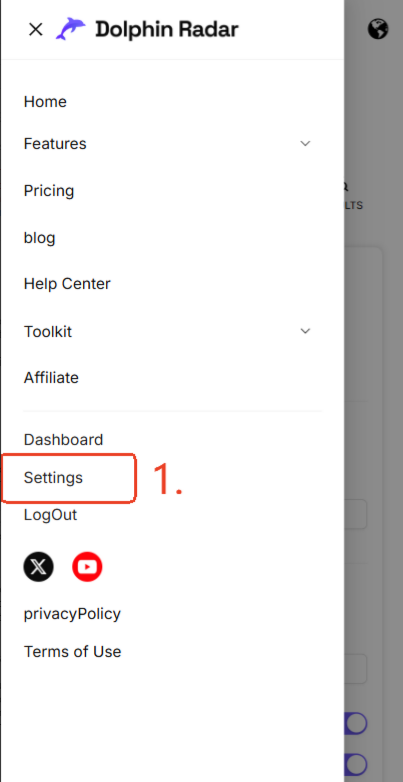
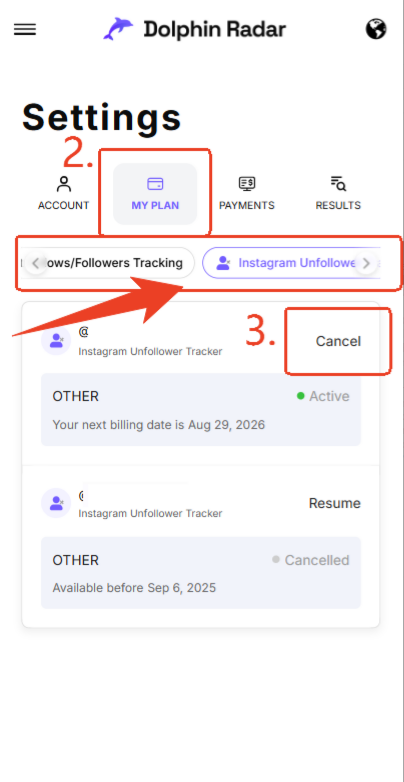
To cancel your subscription, please follow these steps:
- Log in to DolphinRadar.
- Click Dashboard in the top-right corner.
- Go to Settings → Manage Subscription.
- Find the plan you want to cancel and click Cancel Subscription, as shown in the screenshot.
Once canceled, you’ll still have access until the end of your current billing period, and there won’t be any future charges.
On Desktop:
On Mobile:
DolphinRadar (dolphinradar.com) provides digital services that are generally non-refundable once a report has been delivered. However, refunds may be granted in 2 specific cases: repeated delivery failure (5 or more failed deliveries) or if the product does not match the website description. Refund requests must be submitted in writing within 7 days of purchase. Contact the DolphinRadar support team for assistance with any billing concerns. For more details, please visit our Privacy Policy.
DolphinRadar does not currently offer a free trial for its standard tracking subscription plans. To access tracking reports and analytics, you’ll need to choose a Monthly, Quarterly, or Annual plan. View current options on the DolphinRadar Pricing page.
More Instagram Help
Support guides for users who want examples and step-by-step context after reading the FAQ.




Can't find your answer?
We want to answer all of your queries.Click here to submit your feedback, and we will contact you as soon as possible.